










Sensor (MQTT)
Connect and subscribe to real-time data streams using MQTT protocol.
This feature is ideal for integrating IoT devices, sensors, or any system that communicates via MQTT.
This works very similar to Database (https://lygos.io/docs/data/database)
Live updates coming from sensors or IoT devices can be fed to data visualizations and maps on your video wall or live dashboards.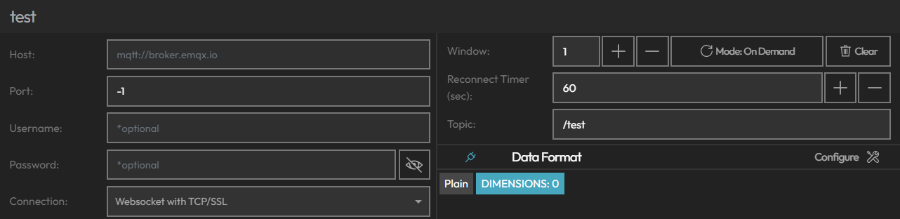
- Host: URL of MQTT Broker
- Port: Port of MQTT Broker
- Connection:
- Websocket with TCP/SSL
- Websocket Unsecure
- MQTT with TCP/SSL
- MQTT Unsecure
- Username/Password: Optional Authentication
- Reconnect Timer: Checks connection every X seconds and if connection is dropped, reconnects and resubscribes.
- Data Window Size: This is how many past results are stored in your data window.
- Data Windows can be used for animations of data visualizations.
- If Data does not have datetime values, data receival time can be used as its temporal value, and thus be animated.
- For example, polling data every minute and with window of 60, you can animate your last hour with 60 data points on data visualizations and maps.
- Data Polling Mode: You can determine if the query is polled on demand or on in the background.
- On Demand: Data is temporary. It is polled only if a visualization is actively using this data source on the screens.
- On Background: Data is persistent. It is polled on the background and data window is stored when app closes or relaunches.
- Data Format: Determine Data Format of incoming data through our Data Format Tool.
- Preview Results: instantly to validate your data before use in visualizations.
- Raw Data: You can see incoming data from MQTT
- Formatted Data: Your final data source after your data is formatted.