










Power Options
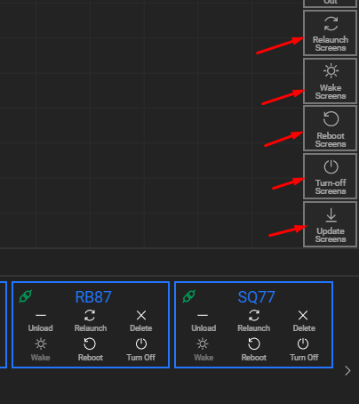
In the Display Module > Screenspace View, you can manage the power settings for computers hosting connected screen nodes of video walls and dashboards.
You can perform these actions:
- Individually: via each screen’s card
- Collectively: via the right-side Quick Menu for the entire screenspace (video wall or dashboard group)
Available Power Options
🔄 Relaunch Screens
- Restarts the Lygos application on the selected machines.
- The app will reopen windows in their last saved positions.
💡 Wake Screens
- Sends Wake-on-LAN packets to power on machines remotely.
- Requires Wake-on-LAN enabled in BIOS
- Devices must be on the same local network
- If Auto-Launch is enabled, Lygos starts with the OS and restores windows to their last positions.
🔁 Reboot Screens
- Reboots the entire OS of the target machines.
- If Auto-Launch is enabled, the Lygos app will start automatically on boot and restore previous window positions.
⏻ Turn Off Screens
- Shuts down the operating systems of the selected machines.
- Devices can be powered back on using Wake Screens (if Wake-on-LAN is enabled in BIOS).
⬆️ Update Screens
- Checks for updates on the screen launchers.
- Installs any updates and relaunches screen clients afterward.
Additional Notes
Connection Status Icon
- Indicates whether the screen is currently connected to the Lygos server.
Deleting a Screen
- Only closes the screen window on the target machine.
- It does not exit the Lygos application on that machine.