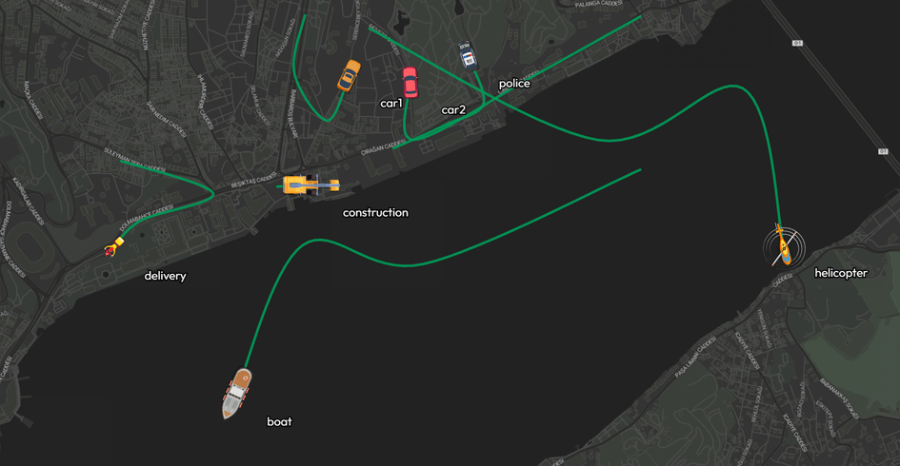
Tracking Layer
The Tracking Layer is engineered for real time spatial monitoring, allowing administrators to visualize both the live positions and historical movement paths of mobile assets. This capability is essential for dynamic logistics operations, fleet management, and continuous mobile asset tracking. When projecting live tracking feeds onto a central operations video wall, this layer provides dispatchers and monitoring teams with an immediate, unified view of moving targets and their precise trajectories across the map. By leveraging timestamped coordinate data and unique entity identifiers, the system dynamically plots routes and actively updates current locations, ensuring comprehensive situational awareness over all mobile infrastructure.
Features
- Live Tracking
- Display the current position of tracked entities in real-time.
- Path History
- Show the historical route each entity has followed based on timestamped coordinates.
How to Use
- Load tracking data into your layout.
- Your dataset should contain at least:
- Latitude and Longitude for position
- A timestamp field to order the path
- A vehicle or device ID to distinguish different tracked items
- The Tracking Layer Settings will appear in the Settings tab.
- Configure how paths and markers appear (custom settings may include line color, line width, marker icon, etc.).
Use Case Examples
- Fleet vehicle tracking
- Delivery route visualization
- Mobile asset movement history