










Images
The Images module provides a straightforward way to bring static visual content into your Lygos environment. Whether you are building a control room dashboard or deploying high resolution graphics across massive, multi screen video walls, this element allows you to seamlessly upload, edit, and configure individual pictures for your displays. It features built in tools for precision cropping, color adjustment, and dynamic scaling to ensure your visual assets look perfect on any screen size or layout. Images can be deployed to any section of the video wall, in any layout. Users need to create a new image document from Management Client. Afterwards, they would need to import image they want to display. This image document can now be deployed to any layout of any screen space (video wall).
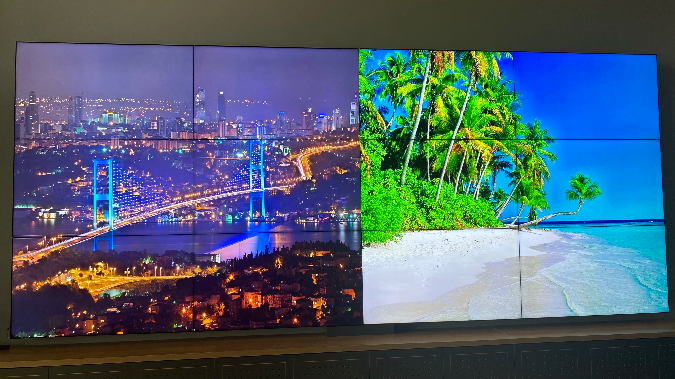
How to configure and display images on video walls and dashboards
📥 Import & Export
- Supported Import Formats: JPEG, PNG, TIFF, BMP, GIF
- Export Formats: JPEG, PNG
- Drag & drop or manually import an image.
⚠️ Only one image per Image document is allowed.
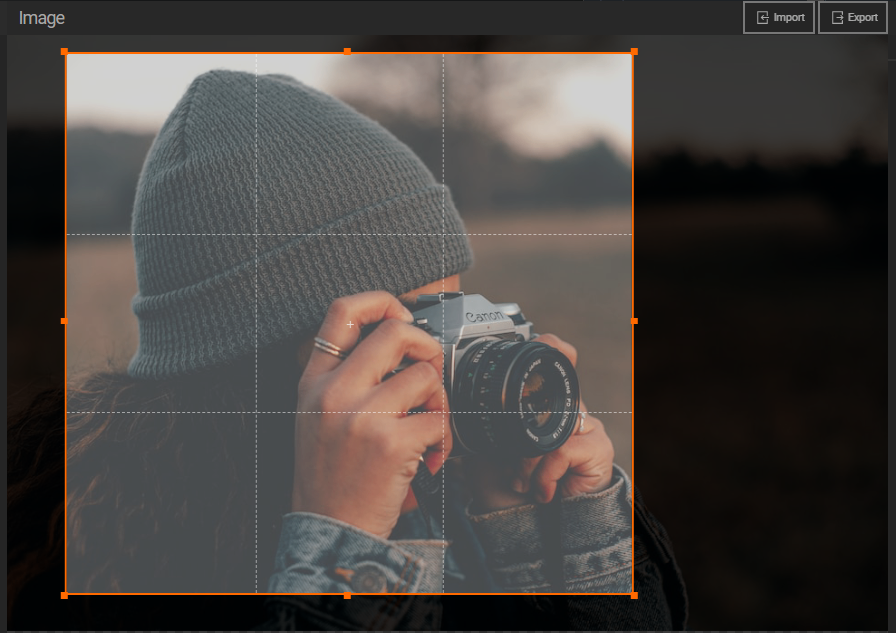
✂️ Image Cropping
Figure 1.1: Crop your image by adjusting the crop area.
You can:
- Select a fixed aspect ratio (e.g., 16:9, 4:3) or use Free mode for custom cropping.
🛠️ Image Controls
- 🔍 Zoom in and out
- ⬅️➡️ Move image using arrow buttons
- 🔄 Rotate 90° left or right
- 🔃 Flip horizontally or vertically
- 🖥️ Fullscreen view
- 💡 Adjust brightness and saturation
🎛️ Display Modes
(These affect only how the image appears on deployed screens)
- Stretch: Stretches image to fill the container, possibly distorting aspect ratio
- Fit: Maintains aspect ratio, fits image inside the container
- Fill: Fills the container while cropping parts of the image to maintain aspect ratio

Deploy on video walls and Dashboards
Deploy through Image Editor by clicking Deploy. Select a screenspace and select load into first available spot or swap with already deployed visualization.
Deploy through Display Module by navigating Display Module. Select screenspace and layout. Select visualization to deploy and click load or drag and drop into grid area.